
PlayStation App
Entertainment
Stay connected to your PlayStation games and friends
App Screenshots

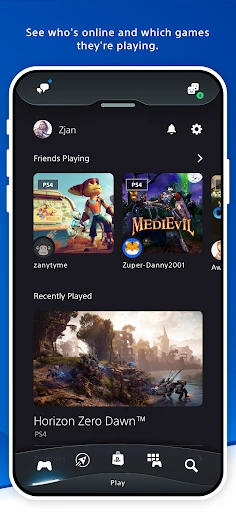

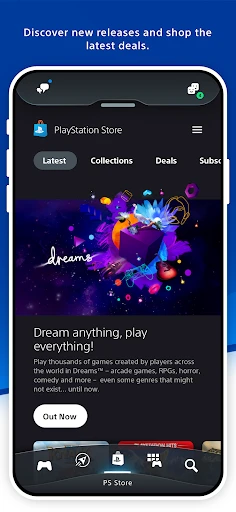

Unlocking the World of PlayStation with the PlayStation App
If you're a gaming fan who loves PlayStation, the PlayStation App is about to become your new favorite sidekick. Think about having the power of your PlayStation right in your pocket, whether you're on the bus or relaxing at home. Sound good? Let me walk you through how this app can totally change the way you use your PlayStation.
A Look That's Easy to Love and Use
Right off the bat, the PlayStation App looks great and is super easy to figure out. The moment you open it, you see a home screen that's both comfortable and full of possibilities. It's like stepping into your own personal gaming hub.
Everything is laid out clearly with simple icons. Looking for new games, checking on your downloads, or sending a message to a friend—it’s all just a quick tap away. They've made it so anyone can use it, no tech skills required.
Never Miss a Moment with Your Gaming Crew
One of the coolest things about this app is how it keeps you linked to your friends. See when a buddy earns a new trophy or jump into a multiplayer session directly from your phone. You can even hop into voice chats, so it feels like you're all gaming together, no matter where you are.
The notifications are a lifesaver. You get instant updates about game news, discounts, and special events. It’s like having a personal gaming assistant that makes sure you're always in the know. Once you get used to it, you won't know how you managed without it.
Take Your Console Games on the Road
This feature is a real standout. Remote Play lets you stream and play your PlayStation games directly on your mobile device. Stuck in a waiting room or hanging out away from your TV? Your game doesn't have to stop.
Getting it set up is simple, and once you're connected, it's like having a tiny PlayStation in your hand. The connection is solid, with very little delay, making it perfect for getting your game on when you're out and about.
An App That Gets You
What really makes the PlayStation App special is how it adapts to you. It suggests games you might like based on what you've played and fills your news feed with stuff you care about. It honestly feels like the app understands your gaming tastes.
You can also tweak your profile and show off your hard-earned trophies. It's a nice personal touch that makes the whole experience feel like it's truly yours.
Wrapping It Up
In an age where we all want things to be easier, the PlayStation App is a total winner. It's a must-have for any PlayStation fan who wants to get more out of their hobby. From organizing your games and chatting with friends to playing anywhere with Remote Play, this app does it all. So why not download it and see how the PlayStation App can level up your playtime?
Key Pros
- Seamless integration with PlayStation console.
- Real-time notifications and updates.
- Remote game downloads and installations.
- Access to PlayStation Store offers.
- Social connectivity with friends.
Things to Note
- Requires constant internet connection.
- Occasional lag in app performance.
- Limited features compared to console.
- Large storage space required.
- In-app purchases can be costly.
Frequently Asked Questions
Q: What features does the PlayStation App offer?
A: The PlayStation App provides a range of features for PlayStation users. It allows you to connect with friends, receive notifications, game alerts, and invitations, and use your mobile device as a second screen in supported games. Additionally, you can browse the PlayStation Store, download games remotely, and manage your console settings directly from the app.
Q: Is the PlayStation App available for both Android and iOS?
A: Yes, the PlayStation App is available for download on both Android and iOS devices. You can find it on the Google Play Store for Android devices and the Apple App Store for iOS devices. Ensure your device is compatible with the app by checking the system requirements on the respective store page.
Q: Can I use the PlayStation App to chat with friends?
A: Absolutely, the PlayStation App allows you to chat with your PlayStation Network friends. You can send and receive text messages and voice chat directly through the app. This feature makes it easy to stay connected with your gaming community, even when you are away from your console.
Q: Does the PlayStation App support remote game downloads?
A: Yes, one of the convenient features of the PlayStation App is the ability to initiate game downloads remotely. This means you can purchase and download games from the PlayStation Store and have them ready to play when you get home. Make sure your console is set to stay connected to the internet in Rest Mode to use this feature.
Q: How secure is the PlayStation App?
A: Security is a priority for the PlayStation App. It uses encryption to protect your personal information and login credentials. Additionally, you can enable two-step verification on your PlayStation Network account for added security. It's recommended to regularly update the app to benefit from the latest security enhancements.
You May Also Like

Empower®

myChevrolet

Mods for Dmod

Careem: Rides, Food & more

LinkedIn Learning

Citizens Bank Mobile Banking

Super Teacher

TicketSwap - Buy, Sell Tickets

BMO Digital Banking

CBS

ShortMax - Watch Dramas & Show

Webull: Investing & Trading

Passport Parking

Fandango at Home

Ventusky: Weather & Live Radar

Instacart: Get Food Delivery

FlashGo: Fake GPS Location

Access Corrections

Scandit SDK Showcase