Vizio Smart TV Remote
House & Home
Smart remote for your Vizio television control
App Screenshots
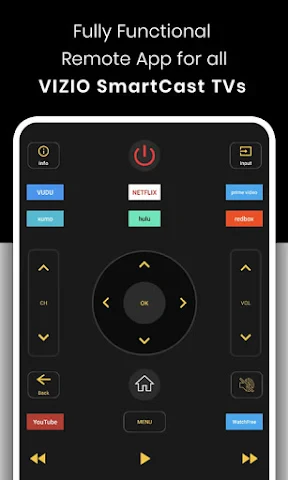
So, you’ve got your fancy new Vizio Smart TV, and you’re probably thinking about how to make the most out of it. That’s where the Vizio Smart TV Remote app comes into play. I’ve had a chance to play around with this app, and let me tell you, it’s quite the game changer for Vizio TV owners.
Effortless Setup and Connection
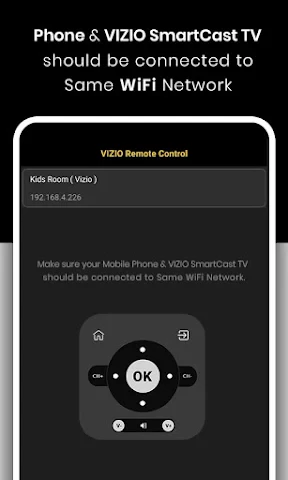
The first thing that impressed me was how simple it was to link the Vizio Smart TV Remote app with my TV. I just made sure my phone and TV were connected to the same Wi-Fi, and bam, they were paired almost instantly. It might sound minor, but there's a real pleasure in not having to search for the remote every single time you want to switch channels or tweak the volume.
An Interface That's a Breeze to Use
After getting connected, moving around the app is super straightforward. The design is really clear, so even if you're not a tech expert, you'll get the hang of it quickly. All the important controls are right there on your screen—like switching inputs or messing with the settings.
I especially liked the touchpad feature. Swiping and tapping on my phone screen felt way more natural than clicking buttons on a standard remote. It’s almost like having a magic wand for your television!
Leveling Up Your TV Time
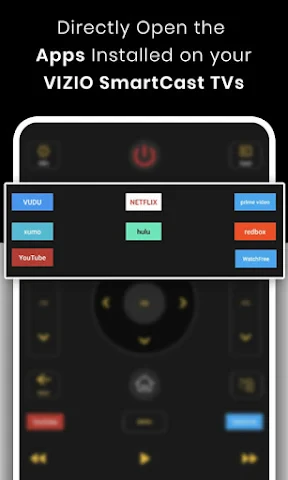
On top of that, the app lets you use the SmartCast feature, which means you can send videos and shows straight from your phone to the TV. Watching your top picks on a large screen has never been easier. Also, since you can open apps right from the remote app, you don't have to keep switching between gadgets.
I thought the voice command option was really useful, too. Just talk into your phone, and it handles everything. Whether you're looking for a particular movie or need to change the volume, it's all completely hands-free. And let's be real, who doesn't enjoy feeling like they're in the future?
Wrapping It All Up
All in all, the Vizio Smart TV Remote app is a great partner for your Vizio Smart TV. It adds a layer of ease and modern flair that your basic remote can't match. From the simple setup to the intuitive design, it really improves how you use your TV. If you haven't given it a shot yet, I'd say it's totally worth downloading. It's free, straightforward, and it might just change the way you watch TV for good.
Key Pros
- User-friendly interface for easy navigation.
- Quick setup and connection to TV.
- Supports voice commands for convenience.
- Customizable remote layout.
- Works with multiple Vizio TV models.
Things to Note
- Limited features compared to physical remote.
- Occasional lag in app response.
- Requires stable WiFi connection.
- Ads can be intrusive.
- May not support older TV models.
Frequently Asked Questions
Q: What is the Vizio Smart TV Remote app and how does it work?
A: The Vizio Smart TV Remote app is designed to provide users with a convenient way to control their Vizio Smart TVs directly from their smartphone or tablet. By connecting to the same Wi-Fi network as the TV, the app mimics the functionalities of a physical remote, allowing users to change channels, adjust volume, and access various apps and settings without needing the physical remote.
Q: Is the Vizio Smart TV Remote app compatible with all Vizio TV models?
A: The Vizio Smart TV Remote app is compatible with most Vizio Smart TVs released in recent years. However, compatibility may vary depending on the specific model and the software version of the television. It is recommended to check the app's compatibility with your specific TV model by referring to the official app description or the Vizio support website.
Q: Are there any costs associated with using the Vizio Smart TV Remote app?
A: The Vizio Smart TV Remote app is generally free to download and use. However, some features may require an in-app purchase or subscription. It's advisable to review the app's details in the Google Play Store or Apple App Store to understand any potential costs involved, especially if you plan on using advanced features.
Q: What are the key features of the Vizio Smart TV Remote app?
A: Key features of the Vizio Smart TV Remote app include the ability to power the TV on and off, change channels, adjust volume, and navigate through on-screen menus. The app also offers integration with popular streaming services, voice command support, and easy access to input selection. It transforms your smartphone into a fully functional remote control, enhancing user convenience and accessibility.
Q: How secure is the Vizio Smart TV Remote app regarding user data?
A: The Vizio Smart TV Remote app is designed with user privacy and security in mind. It requires permission to access the device's network settings to function properly. Vizio adheres to industry-standard security protocols to protect user data. However, it's always wise for users to read the privacy policy and terms of service to understand how their data is handled and ensure that their home network is secure to prevent unauthorized access.
You May Also Like

Bonjour RATP

Camy — Live Video CCTV

Baby Shark World for Kids

Suka:AI Character&AI Story
Walmart MoneyCard

Hooked on Phonics Learning

Tides Near Me

Celeb Prank Call

Sendwave—Send Money

Denny's

Tubi: Free Movies & Live TV

Live Satellite View GPS Map

Uber Lite

MyDyson™

ChowNow: Local Food Ordering
Mobile Connect to TV USB HDMI

Zomato: Food Delivery & Dining

Huntington Mobile Banking

STARZ