Mobs Maker for Minecraft PE
Libraries & Demo
Craft Mobs Spawners For Minecraft Pocket Edition
App Screenshots



Mobs Maker for Minecraft PE: Unleash Your Creativity
Getting Started: A Total Breeze
First things first, getting Mobs Maker on your phone is super simple. You can find it on both the App Store and Google Play. The app is light and won't slow down your device. When you open it up, everything is laid out clearly. It's easy for newcomers to understand but still has plenty of features for pros. The quick guide gets you up to speed fast, so you can jump right in and start creating without any fuss.
Crafting Your Perfect Creature
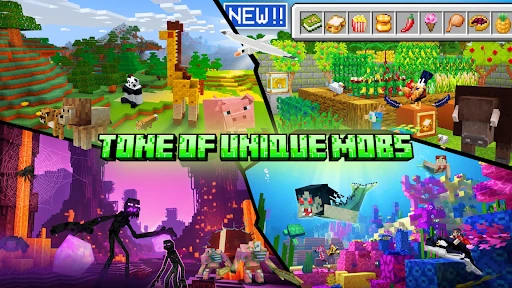
This is the really fun part! You get a ton of tools to build your own unique mobs, and it's both easy and enjoyable. There's a huge selection of textures, colors, and body parts to play around with. Whether you want to make something adorable or a terrifying monster, your options are almost limitless. I lost track of time trying out different looks, and each new combo was more fun than the last.
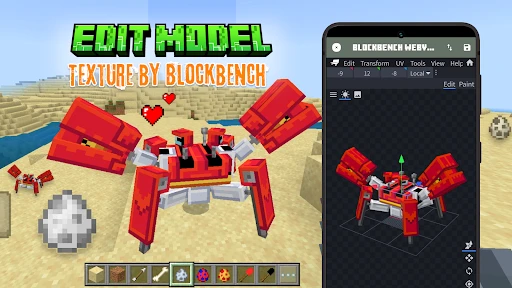
A really cool feature is that you can make your mobs move. You can bring your creations to life with simple animation tools. These tools are powerful but still user-friendly, so even if you've never animated before, you can make your mobs walk, jump, or do a little dance. It's details like this that turn Mobs Maker from a simple app into a full creative playground.
Bringing Your Creations into the Game
You're probably thinking, "How do I get these custom mobs into my Minecraft PE world?" Don't worry, it's a smooth process. Mobs Maker makes it simple to export your designs straight into the game. The app gives you clear, step-by-step directions so your new creatures can start exploring your worlds in just a few minutes. And trust me, there's a special thrill in seeing something you designed yourself running around in your game!
Reasons This App is a Game-Changer
Besides the pure fun of building things, Mobs Maker also has a great community feel. You can share your designs with other players, show off what you've made, and get ideas from their creations too. It's a lively space where everyone is sharing and getting inspired, and you'll always find cool new things to see.
Plus, the app gets new features and content all the time, so it never gets old. It's obvious the people who made it really care about giving users a great experience, and that shows in how well the app works and the cool tools it offers.
Wrapping It Up
To sum it up, Mobs Maker for Minecraft PE is an essential download for any player who wants to get more creative. It hits a perfect balance, being easy to use but also deep enough for serious tinkering. No matter if you're just making mobs for fun or you want to share them with everyone, this app does the job brilliantly. So if you're looking to make your Minecraft PE world even more unique, you should definitely check out Mobs Maker—it's a blast
Key Pros
- User-friendly interface for easy skin creation
- Wide range of customization options
- Regular updates with new features
- Supports direct export to Minecraft PE
- Includes a variety of pre-made templates
Things to Note
- Limited free features in the basic version
- Some templates require in-app purchases
- Occasional ads interrupting the workflow
- Interface might lag on older devices
- Requires internet for full functionality
Frequently Asked Questions
Q: What is Mobs Maker for Minecraft PE?
A: Mobs Maker for Minecraft PE is a creative application designed for Minecraft Pocket Edition players. It allows users to design, customize, and integrate new mobs into their game. With a user-friendly interface, it caters to both beginners and experienced players who wish to enhance their Minecraft experience by adding unique creatures.
Q: How do I install Mobs Maker for Minecraft PE?
A: To install Mobs Maker, first ensure that you have Minecraft Pocket Edition installed on your device. Visit the app store on your Android or iOS device, search for 'Mobs Maker for Minecraft PE', and download the app. Follow the on-screen instructions to complete the installation process and start creating your own mobs.
Q: Is Mobs Maker for Minecraft PE free to use?
A: Mobs Maker offers a free version with basic features that allow users to create and import mobs into Minecraft PE. However, it may also offer in-app purchases or a premium version that provides additional functionalities, such as advanced customization options and an ad-free experience. Always check the app store for the latest pricing details.
Q: Can I share my created mobs with other players?
A: Yes, Mobs Maker for Minecraft PE allows users to share their custom-created mobs with other players. You can export your designs and share them via social media, email, or direct file transfer. This feature enables collaboration and enhances the gaming experience by allowing players to experience each other's creations.
Q: Does Mobs Maker for Minecraft PE require an internet connection?
A: While Mobs Maker can be used offline for creating and customizing mobs, an internet connection is required for downloading the app, accessing additional content, and sharing creations with others. To make the most of the app's features, ensure you have a stable internet connection available when needed.
You May Also Like

Plant App - Identifier & Care

Wegmans Meals 2GO

SG SLS Type Camera

Gusto Mobile

Sherwin-Williams Color Expert™

Michaels Stores

Radar, HUD, Map, Speed Camera

10 Minute Language

DoorDash: Food, Grocery, More

Paint my Room - Try wall color

Carl's Jr.®

Crumbl

Square Team

iRobot Home (Classic)

Islamic Ringtones 2025

Holy Quran - Offline Quran MP3

T-Life

Patreon

NOAA Weather Unofficial
