Yahoo Weather
Weather
Yahoo Weather Accurate Forecasts For Everyone
App Screenshots


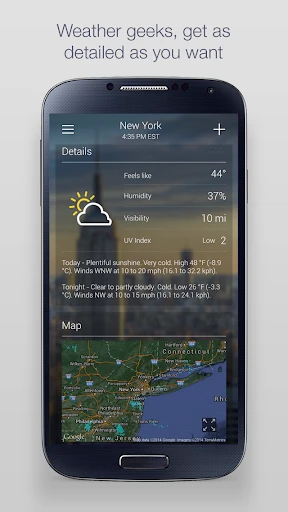
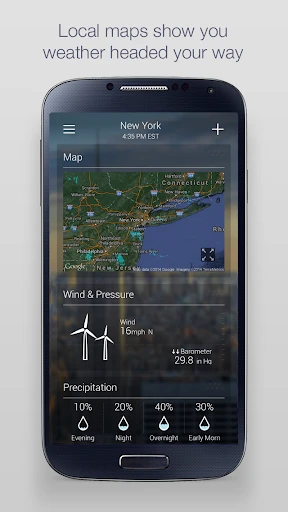

My Go-To Weather Buddy: A Look at Yahoo Weather
Ever been caught in the rain without an umbrella, or worse, left wondering if you should bundle up for a winter chill only to find it’s a warm day? Well, folks, Yahoo Weather might just be the app to prevent those little daily fiascos. I’ve been fiddling with it for a while now, and let me spill the tea about how it works and whether it’s worth the space on your device.
First off, Yahoo Weather’s interface is super sleek and visually appealing. As soon as you open the app, you’re greeted with stunning images that match your current location’s weather conditions. It’s like having a little window to the world, right from your phone! The navigation is intuitive, with a minimalistic design that makes it easy for anyone to use, even if you’re not the most tech-savvy person out there.
Scrolling through the app is smooth, and all your essential weather info is right there at your fingertips. From the current temperature to the 10-day forecast, it’s all laid out in a way that just makes sense. You won’t find yourself getting lost in a sea of unnecessary features.
Here’s where the app shines a bit brighter. Yahoo Weather offers detailed forecasts with hourly, 5-day, and 10-day weather predictions. This means you can plan your week with confidence, knowing whether to pack a raincoat or slap on some sunscreen.
One feature I particularly enjoy is the interactive radar map. It’s pretty nifty, allowing you to see weather patterns in motion. It’s like being your own little meteorologist! The app also provides wind and pressure information, sunrise and sunset times, and even moon phases for those who like to keep track of celestial events.
And for those who love a bit of customization, Yahoo Weather lets you add multiple locations. So, whether you’re keeping tabs on the weather back home or planning a trip abroad, you can easily switch between different places.
Now, let’s talk about the not-so-glamorous side of things. While Yahoo Weather is pretty solid, it does have its quirks. Occasionally, I’ve noticed that the app takes a little longer to update the weather information compared to other apps. It’s not a deal-breaker, but if you’re someone who needs instant updates, it might be a tad frustrating.
Also, the app includes ads, which can be a bit distracting. They’re not overly intrusive, but they’re there nonetheless. If you’re the type who likes a completely ad-free experience, this might be a slight hiccup in your user experience.
All in all, Yahoo Weather is a beautiful and functional app that does exactly what it promises — provides accurate weather forecasts in a visually appealing way. While it has a couple of minor drawbacks, like delayed updates and ads, the positives definitely outweigh the negatives. It’s a reliable companion for anyone who likes to stay prepared for whatever Mother Nature throws their way.
If you’re on the hunt for a weather app that’s both informative and easy on the eyes, Yahoo Weather is definitely worth a download. Give it a whirl and see how it fits into your daily routine. Who knows, it might just become your go-to weather buddy!
Key Pros
- visually stunning weather animations reflect current conditions
- integrates flickr photos of your location for context
- provides detailed atmospheric data like UV index and pressure
- clean
- minimalist interface prioritizes immediate forecast clarity
- five-day forecast with precise hourly breakdowns available
Things to Note
- photo-heavy design increases data usage significantly
- detailed maps lack granular customization for advanced users
- location-based flickr photos can be irrelevant or outdated
- fewer widget configuration options than some competitors
- notification alerts are less customizable than dedicated apps
Frequently Asked Questions
Q: What is Yahoo Weather and what does it do?
A: Yahoo Weather is a free weather forecasting application for mobile devices. Its core function is to provide detailed local and global weather forecasts, including current conditions, hourly predictions, and extended 5-10 day outlooks. The app is known for its clean, visually appealing interface that pairs forecast data with relevant Flickr photos of the location. Basic usage involves allowing location access or searching for a city to receive immediate weather information.
Q: Is Yahoo Weather completely free to use?
A: Yes, Yahoo Weather is a free application with no upfront cost or subscription fee for its core weather services. The app does not contain in-app purchases. It is supported by advertisements displayed within the interface. No additional equipment is required to use its primary features. The main permission it requests is location access to provide automatic local forecasts, but this can be managed in device settings.
Q: On which devices and platforms is Yahoo Weather available?
A: Yahoo Weather is available as a native application for both iOS and Android mobile operating systems. It is optimized for smartphones and tablets. There is also a web version accessible through desktop browsers. The app is designed for general public use, offering weather data for thousands of locations worldwide. It adapts its interface to different screen sizes but does not have dedicated versions for specialized hardware like smartwatches.
Q: What are the unique technical features of Yahoo Weather?
A: Yahoo Weather's distinctive technical characteristics include its integration with Flickr, which provides beautiful, location-specific background imagery. It offers detailed meteorological data like humidity, wind speed, pressure, and UV index. The app features interactive radar, satellite, and heat maps for visual weather tracking. Notifications for severe weather alerts and daily forecast summaries are also key features. Its design is focused on presenting comprehensive data in an easily digestible, visually-driven format.
Q: How can I manage notifications or report an issue?
A: Notification settings for weather alerts and daily summaries can be managed within the app's settings menu on your device. For troubleshooting common problems like location inaccuracy or app crashes, standard steps include checking your device's location permissions, ensuring the app is updated, or restarting your device. For direct support, users can visit the Yahoo Help Center online. The app does not offer dedicated phone-based customer service; support is primarily provided through online resources and FAQs.
You May Also Like

eufy-original eufy Security

PREMIER Credit Card

NYT Cooking: Recipes & Tips

Star Walk 2 - Night Sky View

Paramount+

Olive Garden Italian Kitchen

Voice GPS & Driving Directions

Pawns.app: Surveys for Money

Yassir - Ride, Eat & Shop

Valley Metro

Earth Camera Online

Necrophone - Spirit Talker

Lingual Coach: Learn with AI

Applebee's

Philo: Shows, Movies, Live TV.

Binance Smart Chain Explorer

Apple tv Remote

Disney+

ABCmouse – Kids Learning Games