Sense Flip Clock & Weather
Weather
Sense Flip Clock Weather Elegant Home Screen Personalization
App Screenshots



About Sense Flip Clock & Weather Feature
Sense Flip Clock & Weather is an elegant and highly customizable application that combines a classic flip clock display with real-time weather information. Designed for both Android and iOS devices, it transforms your smartphone or tablet's screen into a sophisticated digital desk clock and weather station. The app emphasizes a clean, minimalist aesthetic with smooth animations, offering users a visually pleasing and informative always-on display. It serves not only as a practical tool for checking time and weather at a glance but also as a decorative element that enhances the ambiance of any room. With its focus on simplicity and functionality, Sense Flip Clock & Weather appeals to users who appreciate retro design fused with modern digital convenience.
Chapter 1: Function
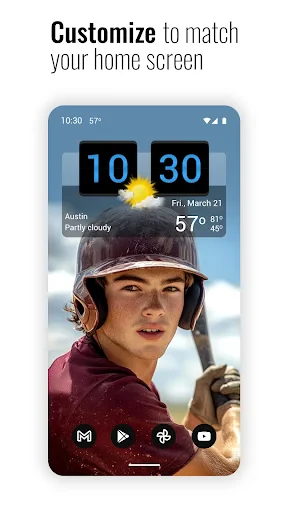
The core functionality of Sense Flip Clock & Weather centers on two primary features: time display and weather reporting. The app presents the time in a dynamic flip clock format, where digits animate with a classic flipping motion, reminiscent of mid-20th-century alarm clocks. This display is highly customizable, allowing users to choose from various clock styles, sizes, and color schemes to match their preference. Simultaneously, the app integrates real-time weather data, showing current temperature, conditions (such as sunny or rainy), and forecasts for the upcoming hours or days. Users can configure weather units (Celsius or Fahrenheit) and select location services for automatic updates or manually set a preferred location. Additional functions include adjustable screen brightness, options to show or hide specific elements like seconds or date, and battery-efficient operation for prolonged use as a bedside or desk clock.
Chapter 2: Value
The value proposition of Sense Flip Clock & Weather lies in its seamless blend of nostalgic design, practical utility, and personalized user experience. Its key advantage is the aesthetic appeal; the smooth, realistic flip animation and clean layout provide a visually calming and retro-chic alternative to standard digital clocks, reducing screen clutter and enhancing focus. Beyond aesthetics, the app delivers significant practical value by consolidating essential information—time and weather—into a single, always-visible interface, saving users from switching between multiple apps. The high degree of customization is another major strength, empowering users to tailor the widget's appearance to their desktop or home screen theme, thereby making it both a functional tool and a personal style statement. Furthermore, the app operates with minimal battery consumption, ensuring it can run continuously without significant drain. It also supports multiple world clocks and detailed weather metrics, catering to travelers and weather enthusiasts. By marrying form and function, Sense Flip Clock & Weather offers a unique digital experience that is both useful and artistically satisfying, standing out in a market saturated with generic weather widgets and clock apps.
Chapter 3: Scenarios
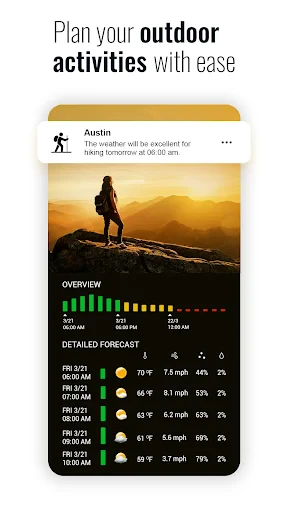
Sense Flip Clock & Weather primarily targets users who value both functionality and visual design in their digital tools. Its key user groups include professionals and students who use tablets or secondary devices as desk clocks, appreciating the clear, at-a-glance information during work or study sessions to minimize distractions. Home users, particularly those who place their devices in living rooms or bedrooms, benefit from its elegant display, which serves as a decorative piece and a convenient way to check time and weather without unlocking their phones. Travelers and individuals monitoring multiple time zones find value in the world clock feature. Additionally, weather-conscious users, such as outdoor enthusiasts or daily commuters, rely on the accurate and accessible forecast data for planning activities. Everyday use cases are diverse: from serving as a bedside alarm clock with a dimmed night mode, to acting as a permanent fixture on a smart home dashboard in the kitchen, to providing a stylish always-on display for an office desk. The app is especially useful in scenarios where quick information retrieval and aesthetic harmony are equally important.
Key Pros
- live weather data animates within the flip clock digits
- minimalist design focuses solely on time and essential weather
- highly customizable widget transparency and size scaling
- smooth flip animation with realistic physical sound effects
- displays feels-like temperature and precipitation chance at a glance
Things to Note
- lacks detailed multi-day forecast graphs common in weather apps
- widget customization requires navigating multiple menu layers
- no severe weather alerts or radar map functionality
- always-on display feature significantly increases battery drain
- weather data update interval is fixed
- not adaptive
Frequently Asked Questions
Q: What is Sense Flip Clock & Weather?
A: Sense Flip Clock & Weather is a digital clock and weather forecast app. Its core function is to display a retro-style flip clock and real-time weather information on your device's screen. It positions itself as a visually pleasing, always-on display tool, primarily for use as a desk clock or ambient information screen. The app focuses on a clean, minimalist aesthetic with smooth flip animations.
Q: Is Sense Flip Clock & Weather free to use?
A: The app is typically free to download and use with basic features. However, it may include in-app purchases to unlock premium themes, advanced weather data, or remove advertisements. No additional physical equipment is required. The app may request permissions for location access (for local weather) and network connectivity. Always check the current listing on your app store for the latest pricing model.
Q: What devices and systems does this app support?
A: Sense Flip Clock & Weather is primarily designed for Android devices. It is commonly optimized for phones and tablets, and often supports features like Always-On Display for compatible models. It may not be available for iOS (iPhone/iPad). The app generally requires a moderately recent version of the Android operating system. Specific version requirements and device compatibility details are listed on the app's official Google Play Store page.
Q: How does the app show weather information?
A: The app displays weather by fetching data based on your device's location or a manually set location. It typically shows current temperature, conditions (e.g., sunny, rainy), and sometimes a multi-day forecast. A core technical feature is its widget functionality, allowing the clock and weather to be placed on the home screen. The weather data source and update frequency depend on the app's design and your settings. For precise data sources, refer to the app's description or privacy policy.
Q: Can the clock widget update in real-time on the home screen?
A: Yes, the primary feature is a live widget. However, on some devices with aggressive battery optimization, the widget update might be delayed or paused when the app is in the background. To ensure real-time updates, you may need to adjust your device's battery settings for this app, exempting it from power-saving restrictions. This is a common system-level behavior, not a specific app bug. The app itself is designed to run the flip animation continuously when active.
You May Also Like

Wells Fargo Mobile®

Speedometer: GPS Speedometer

Mgrs & Utm Map Pro

SkyView® Explore the Universe

AL Quran Kareem - Holy Quran

Sololearn: Learn to code

Earth Map Satellite Live View

Tasty

Rent. Apartments & Homes

Trust: Crypto & Bitcoin Wallet

Character AI: Chat, Talk, Text

7-Eleven: Rewards & Shopping

Starfall

Bitmoji

Pydroid repository plugin

Ranking Filter Funny Challenge

Reel Rush

Night Sky Guide - Planetarium

Alpha Color: Men coloring book