
Weather Screen - Forecast
Weather
Weather Screen Forecast Live Wallpaper Accurate Personalized
App Screenshots


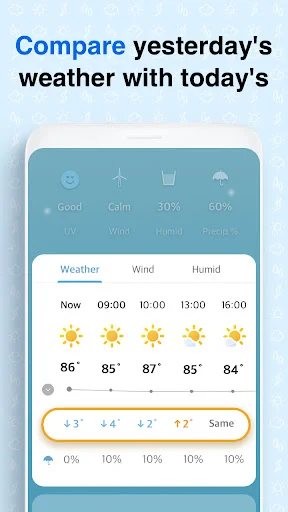
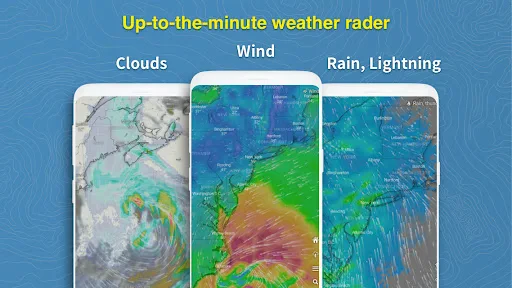
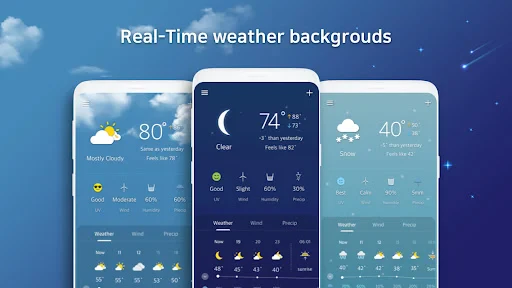
About Weather Screen - Forecast Features
Weather Screen - Forecast is a dedicated weather application designed to transform a device's idle screen into a dynamic, information-rich weather dashboard. It provides users with immediate access to essential meteorological data without the need to unlock their phone or open a separate app. By focusing on at-a-glance readability and aesthetic presentation, it serves as both a practical tool and a personalized screen enhancement, delivering forecasts directly to the home or lock screen.
Chapter 1: Function
The core function of Weather Screen - Forecast is to display comprehensive, real-time weather information directly on a device's home or lock screen through a widget. This widget presents key data points including current temperature, daily high and low forecasts, humidity levels, wind speed and direction, atmospheric pressure, and sunrise/sunset times. It supports detailed hourly forecasts for the next 24 hours and extended daily forecasts for the upcoming week. The app automatically updates this data at regular intervals based on the user's precise location. A central feature is its high level of customization, allowing users to choose from various widget sizes, layouts, color themes, and fonts to seamlessly match their device's aesthetic. It also provides severe weather alerts for timely notifications about storms or other significant conditions.
Chapter 2: Value
The primary value proposition of Weather Screen - Forecast lies in its unparalleled convenience and efficiency in information delivery. By eliminating the steps of unlocking a device and launching an app, it provides instant weather awareness, saving time and streamlining the daily routine. This proactive presentation of data is its key advantage over traditional weather applications. The app emphasizes visual clarity and design, offering widgets that are not only informative but also visually cohesive, turning a utilitarian screen into a personalized and stylish dashboard. Its reliability is underpinned by sourcing accurate weather data from trusted meteorological providers, ensuring users receive precise forecasts and critical alerts. The extensive customization options further enhance its value, catering to diverse user preferences for both functionality and appearance. Users can tailor everything from data density to visual style, ensuring the widget provides exactly the information they need in a format they enjoy viewing. This combination of instant access, reliable data, and aesthetic control creates a seamless and integrated user experience, making weather checking an effortless part of interacting with one's device.
Chapter 3: Scenarios
Weather Screen - Forecast is ideally suited for a broad range of users who prioritize quick access to information and appreciate an organized, efficient digital environment. Its primary target groups include busy professionals and commuters who need to quickly assess the day's conditions before heading out, allowing them to dress appropriately and plan their travel. It is equally valuable for outdoor enthusiasts such as hikers, runners, and cyclists, who require timely updates on weather changes to ensure safe and enjoyable activities. The app also appeals to individuals who value home screen aesthetics and personalization, offering a way to make their device's interface both useful and visually pleasing. Everyday use cases are straightforward: a user simply glances at their phone's screen to see the current temperature and daily forecast while preparing their morning coffee, checks the hourly precipitation chance before leaving the office, or monitors incoming severe weather alerts during a storm. It serves as a constant, low-friction source of environmental awareness for planning everything from daily errands to weekend events.
Key Pros
- displays full-screen weather animations matching actual conditions
- provides hyper-local precipitation minute-by-minute forecasts
- integrates as a live wallpaper with dynamic weather effects
- uses a lightweight engine for real-time animation rendering
- offers detailed atmospheric pressure and wind data layers
Things to Note
- requires always-on location for precise animation accuracy
- high-fidelity live wallpaper increases battery consumption rate
- minute-scale forecast reliability decreases beyond two hours
- complex atmospheric data may overwhelm casual users quickly
- always-on screen animations limit older device compatibility
Frequently Asked Questions
Q: What is Weather Screen - Forecast and its main function?
A: Weather Screen - Forecast is a weather application that provides detailed forecasts and real-time conditions. Its core function is to display comprehensive weather information directly on your device's home or lock screen via a widget, minimizing the need to open the app. It focuses on delivering key data like temperature, precipitation chance, and severe alerts in an easily glanceable format.
Q: Is this app free to use or does it have in-app purchases?
A: Weather Screen - Forecast is a free application. It may offer optional in-app purchases for advanced features or to remove advertisements. The core widget and basic forecasting functionality are accessible without payment. Specific details on premium tiers can be found within the app's description on the official app store.
Q: What devices and systems does this weather app support?
A: The app is designed for Android devices. It requires a compatible version of the Android operating system to function, with specific version requirements available on its Google Play Store page. Its primary feature is the home screen widget, which needs a device and launcher that support interactive widgets for optimal use.
Q: How does the home screen widget work and update?
A: The widget fetches data from its weather service providers. After placement on your home screen, it automatically updates at regular intervals to show the latest forecast. Update frequency can depend on your device's settings and connectivity. If the widget appears stuck, ensuring a stable internet connection and checking the app's background data permissions typically resolves the issue.
Q: Can I get weather alerts and detailed hourly forecasts?
A: Yes, Weather Screen - Forecast provides severe weather alerts and detailed hourly breakdowns. These features are part of its core forecasting data. Alerts and precise hourly conditions are accessible both within the main app and can be configured for display on the widget itself, allowing for proactive planning based on hyperlocal weather changes.
You May Also Like

Zodiac Palm Reader: MagicWay

AI Math Scanner: Maths Solver

Weather Live - Radar & Alerts
Pixel Pro 2 - Watch face

Windy.com - Weather Forecast

Remitly: Send Money & Transfer

Square Team
Murphy Drive Rewards

Dutch Bros

Greeting Cards All Occasions
Web Scan - Dual Accounts

JBL Portable

1Weather Forecasts & Radar

Wasatch Backcountry Skiing Map

PBS KIDS Video

Red Lobster Dining Rewards App

YouTube TV: Live TV & more

My Kitchen: 3D Planner

Epic Freebie Games Radar
