
Nice Weather
Weather
Nice Weather Accurate Forecasts For Daily Planning
App Screenshots


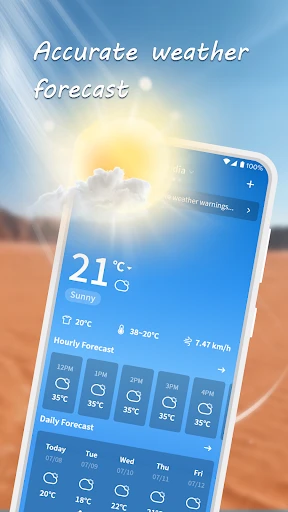

Your Handy Guide to the Nice Weather App
Ever found yourself planning a weekend hike or just deciding what to wear, and you think, "What’s the weather going to be like?" That’s where the Nice Weather app comes in handy. This app is like having a personal meteorologist right in your pocket, and I’ve got to tell you, it’s pretty nifty.
Jumping into the Nice Weather app is straightforward and user-friendly. From the get-go, the interface is clean and modern, making it easy on the eyes. I mean, nobody wants to squint at their screen trying to figure out if they need an umbrella, right? The app’s color scheme is both nice to look at and practical, with different colors showing you different weather conditions.
Getting started is a total breeze — pun intended! Just let the app use your location, and it gives you real-time weather info right away. Whether you're at home or on a trip, this app keeps you in the loop with forecasts for the next few hours and the whole week ahead.
One of the best things about Nice Weather is its super detailed weather info. You get the lowdown on temperature, humidity, wind speed, and even the UV index. It also has this awesome radar map where you can watch live weather patterns move around. So, if you're into weather details, you’ll absolutely love this part.
Now, let’s talk about alerts. The app lets you set up warnings for serious weather—a real game-changer if you live somewhere with crazy weather shifts. Picture getting a ping about a surprise thunderstorm just as you're setting up for a picnic. Now that’s what I call handy.
What really stands out about Nice Weather is how well it works. The app is super fast, with hardly any waiting, so you get your forecast almost instantly. Even on my older phone, it runs perfectly without any problems. Plus, it doesn't use much data at all, which is fantastic news if your data plan is tight.
Another big plus is that you can get it on both Android and iOS, so everyone can stay dry! Downloading and installing the app is quick and simple, and it doesn’t hog space on your phone.
All in all, if you need a weather app you can count on that’s also easy to use, Nice Weather is a great pick. It’s loaded with features that take it beyond the basics, and its slick look makes checking the forecast actually kind of nice. Whether you just need a quick look or you love diving into the details, this app has you covered.
So, the next time you can’t decide between an umbrella or sunscreen, just pull out your trusty Nice Weather app. Honestly, you’ll be amazed at how you managed before!
Key Pros
- provides hyper-local minute-by-minute rain forecasts
- air quality index integrates with health app data
- minimalist interface hides complex data behind gestures
- offers personalized weather-based activity suggestions
- uses device barometer for real-time pressure trends
Things to Note
- requires location always-on for micro-forecast accuracy
- lacks severe weather alerts for rural regions
- gesture controls have a steep learning curve
- activity suggestions drain battery in background
- barometer data limited to newer phone models
Frequently Asked Questions
Q: What is Nice Weather and what does it do?
A: Nice Weather is a weather forecasting application focused on providing precise, hyper-local weather information. Its core functions include real-time conditions, detailed forecasts, and severe weather alerts. It uniquely offers minute-by-minute precipitation forecasts for your exact location. Basic usage involves granting location access for personalized data.
Q: Is Nice Weather free to use or are there in-app purchases?
A: Nice Weather is free to download and use for core forecasting features. The app may offer optional in-app purchases, such as a premium subscription to remove advertisements or to unlock advanced data layers and more detailed historical weather analytics. No additional physical equipment is required to use the app.
Q: On which devices and operating systems does Nice Weather work?
A: Nice Weather is available for both iOS and Android mobile devices. It is optimized for smartphones and tablets. The app requires a stable internet connection (cellular data or Wi-Fi) to fetch the latest weather data and location services to be enabled for personalized forecasts.
Q: How does the hyper-local minute-level rain forecast feature work?
A: This feature uses real-time data from radar and weather stations to predict precipitation start/end times and intensity for your precise GPS location. It models storm movement to give you a timeline, like 'rain starting in 12 minutes,' helping you plan short outdoor activities more effectively.
Q: What should I do if the weather alerts are not appearing?
A: Ensure notifications are enabled for Nice Weather in your device's settings. Verify that location services are allowed for the app, as alerts are location-based. Also, check your app's notification center within its settings. If issues persist, reinstalling the app can often resolve notification delivery problems.
You May Also Like

Compose Material Catalog

Spin Wheel: Random Selection

Organic Maps: Hike Bike Drive

SkySafari 7 Pro

AMC Theatres: Movies & More
Google Home

Tilla Premium

EVENTIM DE: Tickets for Events

NeuroNation - Brain Training

DasherDirect, by Payfare

ID Card, Passport, Driver Lice

Lingvano: Sign Language - ASL

GPS, Maps Driving Directions

Smart Light Smart Home Control

Islamic Songs & Nasheed 2025

Planta: Plant & Garden Care

iQIYI - Drama, Anime, Show

OneBusAway
Local Weather Alerts - Widget
