Timeleft
Events
Timeleft Smart Countdown For Busy Professionals
App Screenshots


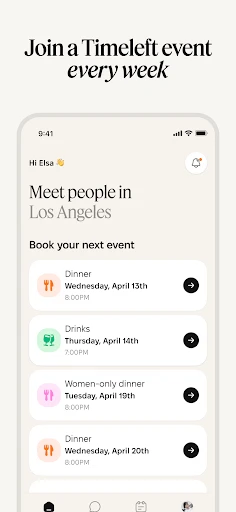

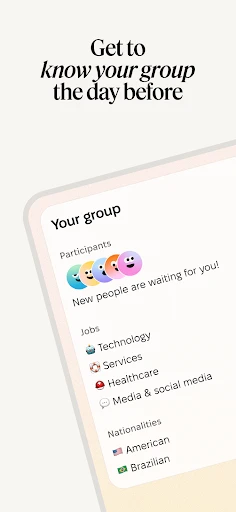
When it comes to managing and optimizing time, Timeleft is a nifty little application that promises to keep you on track with its rich features. I decided to dive into it and see what all the fuss is about. Spoiler alert: it didn’t disappoint!
Getting Started with Timeleft
First off, getting Timeleft on my phone was super simple. You can grab it from the Android or iOS app store, and in no time, it's ready to go. The layout is really user-friendly—it's neat, easy to understand, and doesn't have any annoying extra stuff. I really like that because no one wants to waste time trying to figure out how an app works.
Features That Really Shine
The countdown timer is one of the best parts. No matter if you're tracking a major event, a project deadline, or just waiting for the day to end, Timeleft handles it all. Creating timers is fast and easy, and you can even set up custom alerts so you're always in the know.
Another great tool is the reminder function. I often forget things like birthdays and special dates, so having an app that pings me about them is a total lifesaver. You can set reminders to repeat, which is perfect for regular stuff like weekly catch-ups or monthly payments.
Making It Your Own
Where Timeleft really stands out is in how much you can customize it. You can change how the app looks with different themes and color schemes. It might seem like a small thing, but it makes the app feel much more personal. And let's be honest, it's nice to use an app that looks good, too.
Widget support is another handy feature. You can place your countdowns and reminders right on your phone's home screen. This is ideal for when you need a quick update without opening the app—it's like having a tiny assistant that's always within sight.
Wrapping Up My Experience
In a busy world where every minute counts, an app like Timeleft can really make a difference. It's straightforward but effective, and it has genuinely helped me be more organized and on time. This app is great for anyone wanting to get better at managing their time, whether you're studying, working, or just trying to make your day more productive.
All in all, Timeleft isn't just about counting down the seconds. It's a full-featured time management tool that easily fits into your everyday life. If you're searching for an app to help you stay organized, you should definitely check out Timeleft. I think you'll be glad you did
Key Pros
- Intuitive user interface
- Customizable alerts and reminders
- Wide range of countdown options
- Syncs across multiple devices
- Highly reliable performance
Things to Note
- Occasional lag on older devices
- Limited free version features
- No integration with calendar apps
- Ads present in free version
- Requires internet for some features
Frequently Asked Questions
Q: What is Timeleft and what does it do?
A: Timeleft is an innovative app designed to help users manage their time more effectively. It offers features like countdowns, reminders, and task scheduling, allowing users to allocate their time wisely. Whether you're working on a project or planning an event, Timeleft ensures you stay on track and meet your deadlines efficiently.
Q: Is Timeleft available for both Android and iOS devices?
A: Yes, Timeleft is available for download on both Android and iOS platforms. Users can find it on the Google Play Store for Android devices and the Apple App Store for iOS devices. This cross-platform availability ensures that users can utilize Timeleft's features regardless of their device preference.
Q: Does Timeleft offer any customization options for its features?
A: Absolutely! Timeleft provides a range of customization options to cater to individual user needs. Users can personalize countdowns with different themes, set custom notification tones, and even choose how reminders are displayed. This flexibility ensures that the app adapts to the unique preferences of each user.
Q: Are there any costs associated with using Timeleft?
A: Timeleft offers a free version with basic features that are sufficient for most users. However, for those seeking advanced functionalities, there is a premium version available. The premium version includes additional features such as advanced analytics and ad-free experience, which require a subscription fee.
Q: How does Timeleft ensure user data privacy and security?
A: Timeleft prioritizes user privacy and employs robust security measures to protect user data. The app uses encryption to secure personal information and does not share data with third parties without user consent. Regular updates are also provided to address any security vulnerabilities, ensuring a safe user experience.
You May Also Like

PBS Parents Play & Learn

Life Palmistry - Palm&Gender
AusweisApp Bund

Satellite View:Live Earth Maps

Plant Identifier & Plant Care
Apple Watch for Android

Checkers & Rally's Rewards

Fever: Events & Tickets

Learn Ethical Hacking: HackerX
MTN App ZA
PlayWell: Play to Earn

YouTube TV: Live TV & more

Binance.US: Buy BTC, DOGE, XRP

Astrotalk - Talk to Astrologer

Waze Navigation & Live Traffic

ClassDojo

Drone Remote Control

Super.com - Save, Earn, Travel
Remote for Smart Samsung TV