Transparent clock and weather
Weather
Accurate Clock Weather Forecasts For Global Travelers
App Screenshots

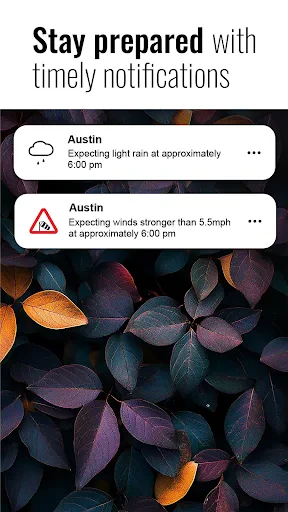


About Transparent Clock and Weather App Features
Transparent Clock and Weather is a multifunctional application that elegantly combines real-time timekeeping with detailed weather forecasting. Its hallmark feature is a visually customizable widget that can display information with a transparent background, seamlessly blending into the user's home screen or lock screen. The app provides users with not only accurate time and date but also comprehensive weather data, including current conditions, forecasts, and severe alerts. Designed for both utility and aesthetics, it serves as a practical yet unobtrusive daily companion for staying informed about the time and atmospheric conditions at a glance.
Chapter 1: Function
The core functionality of Transparent Clock and Weather centers on delivering essential time and weather information through highly customizable widgets. The app displays the current time, date, and day of the week with various font and style options. For weather, it shows the current temperature, perceived conditions (like sunny or rainy), and detailed forecasts for the upcoming hours and days, including highs, lows, precipitation probability, and wind speed. A key feature is the adjustable transparency of its widgets, allowing users to set the background from fully opaque to completely clear, ensuring the information overlays perfectly on their chosen wallpaper. Additional functions include multiple widget sizes and layouts, world clock support for different time zones, and configurable update intervals for weather data to ensure accuracy.
Chapter 2: Value
The primary value proposition of Transparent Clock and Weather lies in its perfect fusion of personalized utility, aesthetic integration, and information clarity. Its standout advantage is the transparent widget, which transforms a purely functional tool into a design element. Users are no longer forced to choose between an informative widget and a beautiful home screen; this app allows both to coexist harmoniously. The value extends beyond aesthetics to comprehensive, reliable data. By sourcing weather information from trusted providers, the app ensures users receive accurate forecasts crucial for daily planning. The high degree of customization is another significant advantage. Users can tailor almost every aspect, from widget transparency and size to time fonts, weather icons, and data units, creating a personalized information hub that fits their unique style and needs. Furthermore, the app operates efficiently, with minimal impact on battery life, making it a reliable and sustainable choice for continuous use. It consolidates the need for separate clock and weather apps, offering a streamlined, elegant, and highly functional all-in-one solution that enhances both the usability and visual appeal of the user's device.
Chapter 3: Scenarios
This app is ideally suited for a wide range of users who value both information accessibility and device personalization. Its primary target groups include busy professionals and students who need to quickly check the time and weather to plan their day and commute efficiently. The transparent widget is particularly valuable for home screen enthusiasts and users who enjoy customizing their phone's aesthetics, as it provides vital information without cluttering their carefully arranged layouts. Furthermore, travelers benefit from the world clock feature and reliable local weather updates when in new locations. Everyday use cases are straightforward and frequent. A user might glance at their home screen widget first thing in the morning to assess the day's weather before choosing an outfit. Throughout the day, the widget serves as a constant, unobtrusive reference for the time and any incoming weather changes. For someone working from home, it provides a subtle, always-on display on their tablet or secondary phone. The app is also useful for outdoor planners, such as gardeners or event organizers, who rely on precise hourly forecasts. In essence, it seamlessly integrates into the daily routines of anyone who wants immediate access to time and weather in the most visually pleasing way possible.
Key Pros
- widgets show real-time weather inside clock digits
- minimalist design avoids cluttering the home screen
- highly customizable transparency and color schemes
- integrates forecast seamlessly into a single glance
- ultra-low battery consumption for always-on display
Things to Note
- lacks severe weather alerts and radar maps
- detailed data requires frequent manual location refresh
- advanced customization needs paid version unlock
- no lifestyle recommendations (e.g.
- pollen
- UV)
- widgets may overlap icons on crowded screens
Frequently Asked Questions
Q: What is Transparent Clock & Weather's core function?
A: Transparent Clock & Weather is a home screen widget app that displays a semi-transparent clock and current weather conditions. Its core function is to provide at-a-glance time and weather information directly on your device's home or lock screen, minimizing the need to open a separate app. It positions itself as a lightweight, visually unobtrusive tool for quick daily info checks.
Q: Is this app free to use with any hidden costs?
A: The app is free to download and use its basic clock and weather widget features. It may contain optional in-app purchases for premium themes, advanced customization options, or an ad-free experience. No additional physical equipment is required. The app may request permissions for location (for accurate local weather) and network access.
Q: On which devices and systems does this app work?
A: Transparent Clock & Weather is designed primarily for Android devices. It functions as a widget, so compatibility depends on your device's home screen launcher supporting standard Android widgets. It is not typically available for iOS due to system restrictions on home screen widgets. It generally works on most modern Android versions (e.g., Android 8.0 and above).
Q: How can I customize the widget's transparency and style?
A: Customization is a key feature. Open the app's settings to adjust widget transparency, clock format (12/24 hour), font styles, color schemes, and weather units (Celsius/Fahrenheit). You can often choose from various widget sizes to fit your home screen layout. These settings are applied after you add or long-press the widget on your home screen.
Q: Why does the weather data sometimes not update correctly?
A: Incorrect weather data usually stems from location or network issues. Ensure location services are enabled for the app and your device has a stable internet connection (Wi-Fi or mobile data). The app relies on a third-party weather data provider; occasional inaccuracies or delays can occur. Try manually refreshing the widget or reinstalling it if problems persist.
You May Also Like

Premium Parking

BALA AI: Character AI Chat App

Tasker by Taskrabbit

Postmates - Food Delivery

Voice GPS & Driving Directions
Minecraft Education Preview

Star Walk 2 - Night Sky View

Live Mic to Bluetooth Speaker

iQIYI - Drama, Anime, Show

EVENTIM DE: Tickets for Events

GoMining - Coin Mining App

Empower®

El Pollo Loco - Loco Rewards

MoneyLion: Bank & Earn Rewards

Tile: Making Things Findable

Learn Languages - Lucida AI

Valley Metro

PlayStation App

Earth Camera Online