
Weather & Clock Widget
Weather
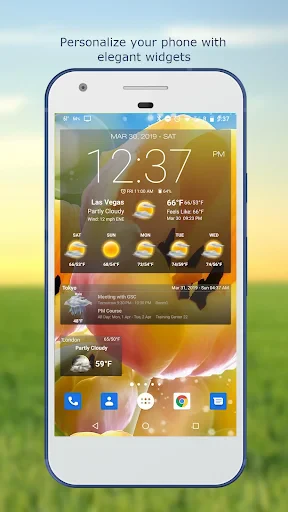
Weather Clock Widget Personalize Your Home Screen
App Screenshots

About Weather & Clock Widget Features – Your All-in-One At-a-Glance Companion
Weather & Clock Widget is a highly customizable Android and iOS application that transforms your device's home or lock screen into a dynamic, information-rich dashboard. It seamlessly integrates elegant time displays with detailed, hyper-local weather forecasts, all presented through a vast array of visually appealing widgets. The app is designed for users who prioritize both form and function, offering a perfect blend of real-time data utility and aesthetic personalization to elevate the everyday smartphone experience.
Chapter 1: Function
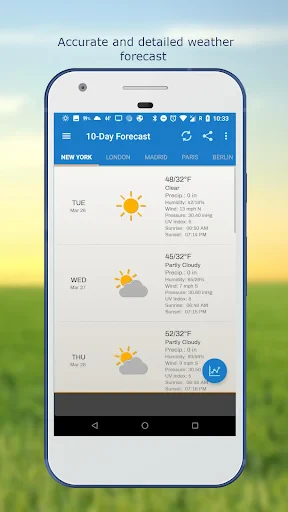
The core functionality of Weather & Clock Widget centers on providing at-a-glance information through fully customizable widgets. Users can display the current time in numerous digital and analog styles, complete with options for time zones and date formats. Simultaneously, the app delivers comprehensive weather data, including current conditions, hourly forecasts for the next 48 hours, and a detailed multi-day outlook. This data encompasses temperature, perceived conditions, precipitation probability, wind speed and direction, humidity, and UV index. The app supports multiple weather data providers for accuracy. Its primary interface is the widget itself, which users can resize, style, and place freely on their screens, with background updates ensuring information is always current without needing to open the app frequently.
Chapter 2: Value
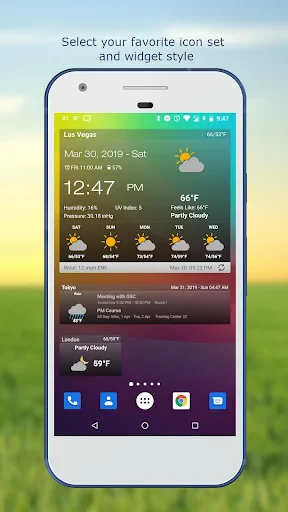
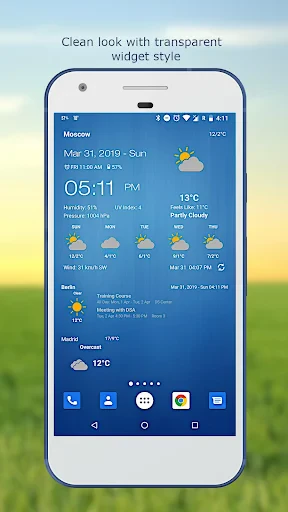
The primary value proposition of Weather & Clock Widget lies in its exceptional customization and reliable, consolidated information delivery. Unlike standard system widgets or pre-set apps, it offers unparalleled personalization. Users can choose from hundreds of widget themes, adjust colors, fonts, and layouts, and decide exactly which data points are displayed, creating a unique look that matches their personal style or home screen aesthetic. This transforms a utilitarian function into a design element. Beyond aesthetics, its key advantage is accuracy and depth. By sourcing data from professional meteorological services, it provides forecasts users can trust for daily planning. The ability to monitor severe weather alerts directly on the widget adds a layer of practical safety. Furthermore, its efficiency is a major benefit; it consolidates two essential pieces of daily information—time and weather—into a single, space-saving widget, reducing the need to open multiple apps. This combination of deep customization, reliable data, and streamlined utility delivers a superior user experience that enhances both the productivity and personal expression of the device owner.
Chapter 3: Scenarios
This app is ideally suited for a broad range of users who value efficiency, personalization, and staying informed. Frequent travelers and professionals managing schedules across time zones benefit immensely from the multi-timezone clock displays, allowing them to track home and office times simultaneously. Outdoor enthusiasts, such as hikers, runners, and event planners, rely on its detailed hourly precipitation and condition forecasts to make critical activity decisions. General daily commuters use it to quickly decide on attire, transportation, or the need for an umbrella by glancing at their home screen. The app also appeals strongly to tech-savvy individuals and smartphone enthusiasts who enjoy curating their device's interface, as the widget serves as a centerpiece for a personalized, information-dense home screen layout. In everyday use, a user might check the widget first thing in the morning to assess the day's weather, use it to monitor incoming storm alerts during the afternoon, and finally, use its elegant clock display as a bedside nightstand clock, demonstrating its versatile utility from dawn to dusk.
Key Pros
- highly customizable widgets for both weather and time
- integrates detailed weather forecasts directly into the home screen
- offers a wide variety of unique
- artistic widget design themes
- minimal battery consumption despite constant live updates
- one-tap timezone conversion for global clock widgets
Things to Note
- some intricate widget styles require a paid premium version
- advanced customization options have a steep learning curve
- certain weather data sources are region-locked or less accurate
- widget resizing can be finicky on some android launchers
- initial setup involves multiple permission grants for full functionality
Frequently Asked Questions
Q: What is the core function of Weather & Clock Widget?
A: Weather & Clock Widget is a utility app that provides at-a-glance weather forecasts and time information directly on your device's home screen. Its core function is to display customizable widgets showing current and future weather conditions, temperature, and a clock. It eliminates the need to open a separate app for basic weather and time checks, focusing on convenience and home screen customization.
Q: Is this app free to use, or does it have in-app purchases?
A: This app is designed for Android devices. Compatibility depends on the specific version; it generally requires a recent version of the Android operating system that supports widget functionality. It is not available for iOS due to system restrictions on home screen widgets. The app does not require any additional external hardware to function.
Q: What devices and systems is this widget app compatible with?
A: Weather & Clock Widget requires location permission to provide accurate local weather forecasts. The app's privacy policy, available on its official store page, details how this data is used. Typically, location data is used solely for weather services and is not shared. The app may also require network access to fetch weather updates.
Q: Can I customize the appearance of the weather and clock widgets?
A: Yes, customization is a key feature. You can usually choose from various widget sizes, themes, fonts, and color schemes. The app allows you to adjust which weather metrics are displayed (e.g., humidity, wind speed) and the clock format. These settings are managed within the app's configuration menu after adding the widget to your home screen.
Q: Why is my widget not updating or showing incorrect weather data?
A: Common causes include disabled location services, restricted background data for the app, or a poor network connection. Ensure the app has necessary permissions and background activity is allowed. Also, try manually refreshing the widget or restarting your device. If issues persist, checking the app's official support channels for specific troubleshooting is recommended.
You May Also Like
Tip Calculator

Mileage Tracker by Everlance

Star Tracker - Mobile Sky Map

SplashLearn: Kids Learning App

Real Estate by HAR.com - Texas

Learn Languages - Lucida AI

Merrick Bank Mobile

HD Movie Projector

Human Design: Stella

Weather Live - Radar & Alerts

Popeyes® App

Rock Identifier: Stone ID

Falou - Fast language learning

Vocabulary - Learn words daily

KFC US - Ordering App

Phone Locator: Family Location

Liven: Discover yourself

Invitation card Maker, Design

phyphox
