
YoWindow Weather and wallpaper
Weather
Live Weather Wallpaper Personalized Forecasts For All
App Screenshots

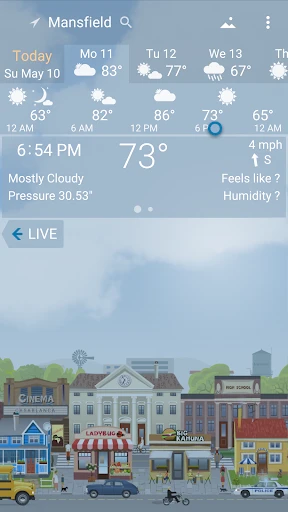
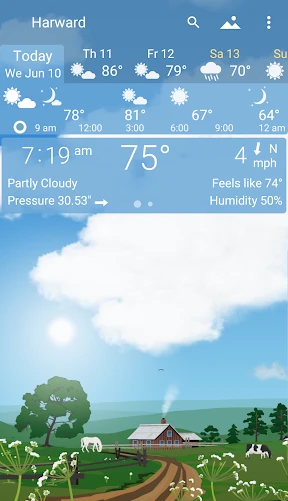


About YoWindow Weather and Wallpaper Feature
YoWindow Weather and Wallpaper is a unique application that seamlessly blends accurate weather forecasting with a visually stunning live wallpaper experience. It transcends the traditional weather app format by presenting meteorological data through a beautiful, animated landscape that reflects real-time and forecasted conditions directly on the user's device screen. This fusion of utility and aesthetics provides an intuitive and engaging way to stay informed about the weather.
Chapter 1: Function
YoWindow Weather operates as a comprehensive weather service and dynamic wallpaper engine. Its core function is to deliver precise, location-based weather forecasts including current temperature, humidity, wind speed and direction, precipitation probability, and detailed hourly and 7-day outlooks. The defining feature is its live wallpaper: a picturesque landscape—such as a rural scene, beach, or city park—that animates to mirror actual weather conditions. Rain falls on the screen, snow accumulates, clouds drift across a sunny or overcast sky, and day transitions to night in real time. Users can interact with the landscape, often by tapping to create rainbows or lightning. The app also provides severe weather alerts and supports multiple global locations.
Chapter 2: Value
The primary value of YoWindow lies in its unparalleled presentation of weather information, transforming mundane data into an immersive, easily digestible visual experience. Its key advantage is intuitive understanding; instead of interpreting numbers and icons, users get an immediate, visceral sense of the weather through a living picture. This reduces cognitive load and makes checking the weather both practical and pleasurable. Beyond aesthetics, it is a robust meteorological tool with reliable data sourced from trusted providers, ensuring users can plan their days with confidence. The app is highly customizable, allowing users to choose their preferred landscape, adjust animation intensity, and configure detailed forecast widgets for the home screen. It offers exceptional value by combining two functionalities—a reliable weather app and a premium live wallpaper—into a single, lightweight application. The constant visual feedback on the home or lock screen fosters a unique connection to the external environment, making it more than just a utility but a calming and informative digital window to the outside world.
Chapter 3: Scenarios
YoWindow is ideally suited for a broad range of users who appreciate both functionality and visual design. Its primary audience includes aesthetics-focused individuals who enjoy personalizing their devices with beautiful, dynamic wallpapers that serve a purpose. It is equally valuable for weather-sensitive users such as outdoor enthusiasts, gardeners, event planners, photographers, and daily commuters who benefit from an at-a-glance, intuitive understanding of current and upcoming conditions. Parents can use the animated landscape as a simple, engaging tool to teach children about weather patterns and seasons. The app serves well in everyday scenarios: a quick glance at the phone screen reveals if it's raining without unlocking the device; planning a weekend outing by observing the animated forecast for the next 48 hours; or simply enjoying a serene, snowy landscape on the lock screen during a winter day. It turns the routine act of checking the weather into a moment of visual delight.
Key Pros
- live landscape wallpaper reflects real-time weather conditions
- offers detailed atmospheric pressure and wind animations
- widgets integrate forecast with interactive scenery
- minimal data usage for continuous background updates
- unique long-term forecast using proprietary climate models
Things to Note
- landscape graphics may appear dated on high-res screens
- advanced radar features require separate paid subscription
- always-on live wallpaper can reduce battery longevity
- limited customization for widget transparency and size
- specialized agricultural weather data lacks depth for pros
Frequently Asked Questions
Q: What is YoWindow Weather and what does it do?
A: YoWindow Weather is a weather forecast app that uniquely combines detailed meteorological data with a live animated landscape that reflects current and forecasted conditions. Its core function is to provide accurate weather information (like temperature, precipitation, and wind) through a visually engaging, interactive wallpaper. The landscape—be it a countryside scene or a city view—changes in real-time to show sunny skies, rain, snow, or fog, offering an intuitive and aesthetically pleasing way to check the weather.
Q: Is YoWindow Weather free to use, or does it have in-app purchases?
A: The live wallpaper is YoWindow's signature feature. Once set as your device's wallpaper, it displays a dynamic scene (like a riverbank or a lighthouse) where the weather animations match real-world conditions from your chosen location. For example, rain will fall on the landscape, leaves will rustle in the wind, and snow will accumulate. This provides an at-a-glance weather visualization. The animation runs continuously or can be configured to conserve battery, and it updates based on fresh weather data fetched periodically.
Q: On which devices and operating systems does YoWindow work?
A: YoWindow Weather operates on a freemium model. The app can be downloaded and used for free with access to basic weather data and a standard set of animated landscapes. It offers in-app purchases to unlock additional features, such as more detailed weather models, a wider selection of high-definition landscapes and themes, advanced widgets, and the removal of advertisements. No additional physical equipment is required to use the app.
Q: How does the live animated wallpaper feature work?
A: YoWindow Weather is primarily available for Android and iOS mobile devices. It also has versions for Windows and macOS computers. The app adapts its interactive landscape and weather display to different screen sizes and orientations. It generally requires a stable internet connection for weather data updates and may have specific minimum version requirements for each operating system, which are detailed on the respective app store listings.
Q: Why is the weather data sometimes inaccurate or not updating?
A: Inaccuracies or stale data typically stem from the app's reliance on third-party weather data providers and your device's connectivity. Ensure your device has an active internet connection. You can try manually refreshing the data or switching the weather source in the app's settings. Also, verify your location settings are correct for precise local forecasts. If issues persist, checking the app's official support channels for service status updates or troubleshooting guides is recommended, as data accuracy is dependent on the external provider's models.
You May Also Like

Holiday Calendar

Ventusky: Weather & Live Radar

Habit Burger & Grill

Pydroid repository plugin

CAVA

IRS2Go

Yandex Maps and Navigator

Atlas Earth - Buy Virtual Land

Vocal Image: AI Voice Coach

AXS Tickets
RadarNow! ®

BALA AI: Character AI Chat App

Publix Delivery & Curbside

OCEARCH Shark Tracker™

Binance Smart Chain Explorer

Rosetta Stone: Learn, Practice

Driver Written Test: 2025 Test

HeyCash: Surveys for Money

Maps All in One, Speedometer
