Graphics Manager : GFX Addon
Libraries & Demo
GFX Tool For Gamers Better Game Graphics Performance
App Screenshots

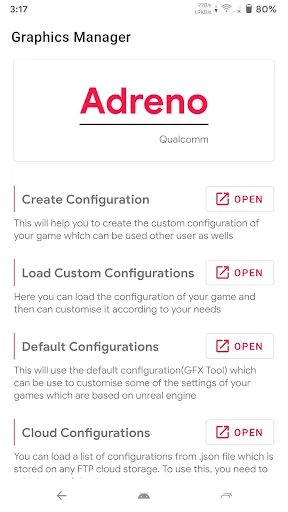
Graphics Manager: GFX Addon
Getting Your Graphics Manager Up and Running
First off, grabbing and installing Graphics Manager is super simple. Android users can just head to the Google Play Store and hit install. The setup is a quick and easy process, and it doesn't ask for a bunch of permissions you don't need, which is always nice.
The app's design is clean and easy to use. You definitely don't need to be a tech expert to find your way around. With everything clearly laid out, you can jump right in and start adjusting settings for a huge variety of games, from shooters to racing titles.
Features That Really Shine
The thing that really stands out about Graphics Manager: GFX Addon is how it lets you tweak the graphic quality and resolution of your games. You can change the frames per second (FPS), adjust texture quality, and turn shadows on or off. This kind of control is perfect for gamers who want to get the best performance and battery life from their device.
Another awesome feature is the Auto Graphics mode. This basically changes the graphics settings on the fly based on how your phone is performing. So if your device starts getting too hot or the game gets choppy, the app will automatically lower the settings to keep things running smoothly. I found this super helpful during long gaming marathons.
How It Performs and Feels to Use
So, does it actually work? From my testing, yes, it does. After playing around with the settings, my games ran much more smoothly. Cranking up the FPS made everything look sharper and more fluid. It's like a free mini-upgrade for your phone. Just remember, your results will depend on what kind of device you have.
I was also happy that the app isn't flooded with ads. There are a few, but they're not annoying, which is a big plus compared to other apps. It also runs in the background without killing your battery; in fact, it helps optimize your battery use, which is a must for anyone who games a lot.
Wrapping It All Up
Overall, Graphics Manager: GFX Addon is a really useful tool for anyone who's into mobile gaming. It gives you a great amount of control and optimization that can seriously improve your gameplay. If you want to boost your phone's performance or just have more say over how your games look, this app is definitely worth a download.
It's not a miracle worker that will make an old phone perform like a brand-new flagship, but it does help make the most of what you have. So if you're looking to step up your mobile gaming, give Graphics Manager a try. It might be just what you need.
Key Pros
- Enhances game graphics quality.
- Optimizes performance for smoother gameplay.
- User-friendly interface for easy setup.
- Supports a wide range of games.
- Regular updates with new features.
Things to Note
- May not work on all devices.
- Can cause overheating on prolonged use.
- Requires in-app purchases for full features.
- Potentially drains battery quickly.
- Needs internet connection for updates.
Frequently Asked Questions
Q: What is Graphics Manager: GFX Addon and what does it do?
A: Graphics Manager: GFX Addon is an application designed to enhance and customize the graphical settings of your mobile games. It allows users to unlock advanced graphic features, adjust resolution, frame rate, and other visual elements, improving overall gaming performance and visual appeal. This app is particularly useful for gamers looking to optimize their experience on devices with limited graphical capabilities.
Q: Is Graphics Manager: GFX Addon compatible with all games and devices?
A: Graphics Manager: GFX Addon is compatible with a wide range of popular games, especially those that allow for graphical customization. However, compatibility can vary depending on the game’s settings and the device’s specifications. It’s crucial to check whether your favorite game supports this app and ensure that your device meets the minimum requirements for optimal functionality.
Q: Does using Graphics Manager: GFX Addon affect the battery life of my device?
A: Using Graphics Manager: GFX Addon can lead to increased battery consumption, as enhancing graphics often requires more processing power. The app optimizes graphics settings, which might result in higher battery usage. Users should be mindful of their device’s battery life and consider adjusting settings to balance performance and power consumption, especially during extended gaming sessions.
Q: Is Graphics Manager: GFX Addon safe to use on my device?
A: Graphics Manager: GFX Addon is generally safe to use, provided it is downloaded from trusted sources like the official app store. The app itself does not contain malware or harmful software. However, users should be cautious of downloading from unofficial sites, which may pose security risks. Always ensure your device’s security settings are updated to prevent potential threats.
Q: Are there any costs associated with using Graphics Manager: GFX Addon?
A: Graphics Manager: GFX Addon may offer both free and premium versions. The free version typically includes basic features, while the premium version unlocks advanced settings and additional functionalities. Users should review the app’s pricing model and determine if the premium features align with their needs, as some features might require in-app purchases to access.
You May Also Like

Weather Live: Weather Forecast

Wawa

Weather - Accurate Weather App

NYT Cooking: Recipes & Tips

JoyReels - Enjoy Short Dramas

AirPlay

Project Gutenberg Ebooks

Prank Call - Fake Call & Chat

StockTiles - Prices & Charts

Bitcoin Price for Wear OS

Plantum - Plant Identifier

Brigit: Cash Advance & Credit

Ghostalker

Merry Call From Santa Claus

Checkbook Key (Remove Ads)

AnkiDroid Flashcards

HungryPanda: Food Delivery

White Castle Online Ordering

Offline Map Navigation