
Weather Widgets
Weather
Weather Widgets Personalized Forecasts For Daily Planning
App Screenshots

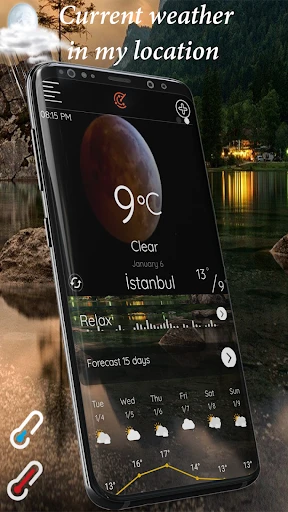
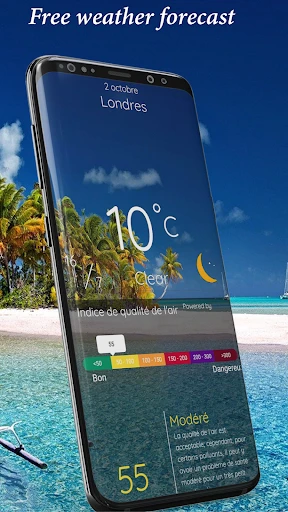


About Weather Widgets Feature – Personalized Forecasts at a Glance
Weather Widgets is a dedicated application that transforms the standard weather forecast into a highly customizable and visually engaging experience directly on a device's home screen. It moves beyond basic temperature readings by offering a diverse collection of stylish, information-rich widgets that provide real-time weather data, detailed forecasts, and atmospheric conditions without needing to open a full app. Designed for users who prioritize both convenience and aesthetic personalization, it seamlessly integrates with the device's interface, delivering crucial meteorological updates at a mere glance. This app serves as a bridge between functional necessity and personal style, making it an essential tool for daily planning and situational awareness.
Chapter 1: Function
The core functionality of Weather Widgets centers on providing a wide array of customizable widgets for the home screen. Users can select from numerous widget sizes, styles, and layouts, ranging from minimalist clock-and-weather combos to detailed panels showing hourly forecasts, precipitation chances, wind speed, humidity, sunrise and sunset times, and extended weekly outlooks. The app typically sources reliable data from professional meteorological services to ensure accuracy. Key functions include deep customization of widget aesthetics—such as fonts, colors, backgrounds, and transparency—and the ability to place multiple widgets for different locations. Furthermore, the app often supports automatic location updates, severe weather alerts, and smooth animations reflecting current conditions, ensuring the information is not only comprehensive but also immediately accessible and visually coherent with the user's chosen theme.
Chapter 2: Value
The primary value proposition of Weather Widgets lies in its fusion of ultimate convenience, enhanced productivity, and personalized design. Its foremost advantage is the elimination of the friction involved in opening a separate weather app; critical information is perpetually visible, saving time and streamlining daily routines. This constant accessibility is invaluable for quick decision-making regarding attire, travel, or outdoor activities. Beyond utility, the app offers significant aesthetic value, allowing users to tailor their device's appearance with elegant, data-rich elements that reflect their personal taste, thereby enhancing the overall user experience and interface satisfaction. Compared to standard weather apps or built-in widgets, it provides superior depth of customization and variety of visual styles. The aggregation of detailed meteorological data into a compact, glanceable format empowers users with a comprehensive environmental awareness that basic forecasts lack. This combination of reliable, real-time data delivery and extensive personalization fosters a sense of control and preparedness, making it a uniquely valuable tool that transcends simple utility to become a personalized dashboard for environmental interaction.
Chapter 3: Scenarios
Weather Widgets primarily targets users who value efficiency, personalization, and staying informed. Its key user groups include busy professionals who need to quickly assess the day's conditions before commuting or scheduling outdoor meetings; travelers and commuters who require accurate, location-specific forecasts for planning routes and activities; and design-conscious individuals who enjoy customizing their smartphone's home screen with functional and beautiful elements. Everyday use cases are abundant. A user might glance at their widget in the morning to decide on a coat and umbrella, seeing an immediate visual cue for rain probability. An event planner could use a large widget to monitor hourly temperature and precipitation trends for an outdoor wedding. A traveler could keep a widget set for their home city and another for their destination, effortlessly tracking conditions in both places. For outdoor enthusiasts like hikers or runners, the widget provides instant access to sunset times and wind conditions, aiding in safe activity planning. Essentially, it serves anyone seeking to seamlessly integrate actionable weather intelligence into their daily digital navigation.
Key Pros
- live weather data on home screen widgets
- hyper-local forecasts using phone's precise location
- minimalist
- highly customizable widget designs
- lightweight operation with low battery impact
- integrates radar and severe weather alerts
Things to Note
- advanced customization requires paid upgrade
- some detailed data only in-app
- not widget
- location accuracy drains battery in background
- widget styles may not match all phone themes
- radar maps need stable internet connection
Frequently Asked Questions
Q: What is Weather Widgets and what does it do?
A: Weather Widgets is a weather application focused on providing customizable, at-a-glance information through home screen widgets. Its core function is to display real-time and forecasted weather conditions directly on your device's home or lock screen. The app gathers data from reliable meteorological sources to show temperature, precipitation, wind, and severe alerts. It positions itself as a highly visual and convenient tool for quick weather checks without needing to fully open the app.
Q: Is Weather Widgets free to use with in-app purchases?
A: The app typically follows a freemium model. The base application is free to download and includes essential widgets and weather data. It usually offers in-app purchases to unlock premium features. These may include advanced widget customization (styles, sizes, themes), more frequent data updates, ad removal, or access to specialized weather data layers. No additional physical equipment is required to use the app.
Q: What devices and systems does Weather Widgets support?
A: Weather Widgets is primarily designed for mobile operating systems that support interactive home screen widgets, such as iOS (14 and later) and Android (various versions depending on widget capability). The specific device adaptation scope depends on the developer's specifications, but it generally covers popular smartphones and tablets. It is not typically available for desktop operating systems or smartwatches as a standalone widget app, unless specified by the developer.
Q: How customizable are the weather widgets?
A: A core technical feature is a high degree of widget customization. Users can usually select from multiple widget sizes (small, medium, large), various visual themes and color schemes, and choose which weather metrics to display (e.g., feels-like temperature, humidity, sunset time, hourly forecast). The app often allows you to set the update frequency for data refresh. Customization is managed within the app's configuration panel, with changes reflected live on the home screen.
Q: Why is my widget not updating or showing location?
A: This is a common usage problem. First, ensure the app has necessary permissions: location services (for automatic location) must be enabled, and background app refresh/data must be allowed. For widgets not updating, try manually refreshing in the app, restarting your device, or re-adding the widget to the home screen. If the issue persists, check your internet connection. For after-sales maintenance, contact the developer's support through the app store listing; there is no information about phone-based customer service.
You May Also Like

Tumile - Live Video Chat

Wise: International Transfers

Military Retirement

SmartRent

Nothing Bundt Cakes

Prime Opinion: Survey for Cash

GPS Satellite View: Live Maps

Offline Maps - Route Planner

FOX

DoorDash: Food, Grocery, More

Pydroid repository plugin

Culver's

Luzia: Your AI Assistant

Snakzy: Earn While You Play

Speedway: Rewards & Shopping

Current: The Future of Banking

HBO Go

PlantIn Plant Identifier, Care

Mods&Skins for Melon
